
Shape Fill Guide: Pick a Picture and Fill It Slowly
By Somia Alex
Pick a Picture First and the Board Makes Sense
Shape Fill starts before the board. It starts in a picture picker. You pick a picture. Then you fill its dashed outline with shape pieces. One piece snaps in. The counter moves up by one. The picture grows.
There is no timer in the play that was checked. There is no lives counter in the play that was checked. The only progress shown in a level is the pieces placed counter. That makes this a calm game. You can play it in a short session. You can stop in the middle of a level and come back to it.
This guide comes from real play on the live game. The picture picker was opened. Level 2 Tree was played. Two of its four pieces snapped in. The level was not finished in that check. This guide tells you what was seen. It also tells you what was not seen.
Quick Answer
Open the Shape Fill page. Press Play Now and then Continue in the game. Open Levels and pick a picture. Look at the dashed outline on the board first. Find the piece in the tray that matches one section of that outline. Drag it onto its matching section and let it snap in. Fill every section to finish the picture.
What Loads When You Open This Page
When you open this page the title screen shows SHAPE SHIFTERS in colorful letter tiles. It shows a rocket built from shapes next to the title. It shows the line Drag Turn Snap Build the picture. This is the game that loads on this page in the check that was done.
The title screen shows a large green Continue button. It also shows Levels and Help and Settings. It shows a star counter at three out of three hundred. It shows a puzzle counter at one out of one hundred. These counters were already at those values in the check that was done. They were not earned in that check. This guide does not claim them as results from this play.
Press Continue to go into the game. Press Levels if you want to pick a picture first. The title screen does not rush you. Read it once. Then pick a picture and start.
Cosy Corner Holds Twenty Pictures
Press Continue in the game and the Levels picker shows Pick a picture. It shows one of twenty built in this world. It shows a star count of three at the top right. World one is called Cosy Corner. It lists twenty levels.
Level one is called House. It was already completed with three stars in the check that was done. That progress was already there before the check. It was not earned in that check. Level two is called Tree. It was in progress in the check that was done. Levels three to twenty were locked with padlock icons in the check that was done.
The picker lists five worlds in total. Cosy Corner is the first world in that list. The other four worlds were not opened in the check that was done. Their names and their pictures are not claimed here. Only Cosy Corner was seen. Only its twenty levels were listed.
That picker changes how you should think about this game. You are not dropped into one board. You choose a picture first. House is the first picture. Tree is the second picture. The rest are locked until you finish the picture before them. Pick Tree only after you know how House works.
Tree at Two Pieces Out of Four
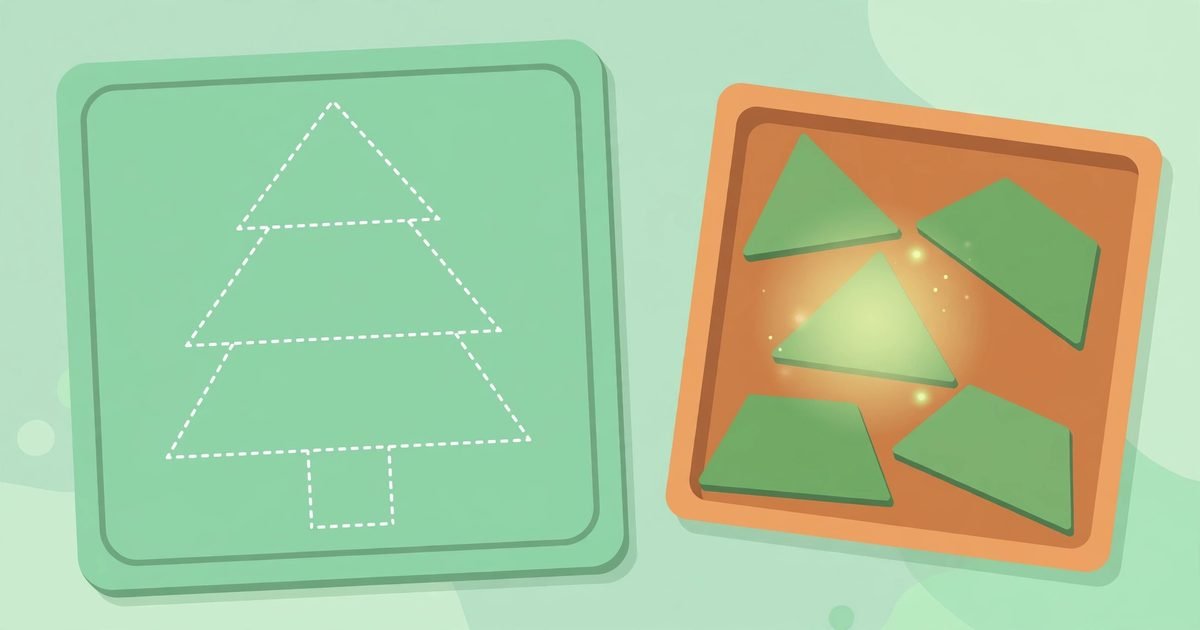
Level two is called Tree. The board is a mint green grid on the left. It shows a dashed white tree outline. The outline has a triangle top and a middle trapezoid and a wider bottom trapezoid and a small square trunk slot at the bottom center. The tray on the right holds the shape pieces.
The top bar during play shows a back icon and Level two and Tree and the pieces counter and a Settings gear. The pieces counter starts at zero out of four. A correct piece snaps into place. The counter goes up by one each time a piece snaps in.
In the check that was done two pieces snapped in. The wide light green trapezoid snapped into the bottom trapezoid section. The counter went to one out of four. The dark green trapezoid snapped into the middle trapezoid section. The counter went to two out of four. The green triangle for the tree top and the brown square for the trunk were still in the tray when play stopped.
The level was not finished in that check. No win screen was seen in that check. No star award was seen in that check. No next level button was seen in that check. The board was left at two out of four pieces. That is the honest end of this play. The guide does not pretend the tree was finished.
Tree teaches you to read size as well as shape. The two trapezoids are both green. They are not the same size. The wide light green trapezoid belongs at the bottom. The dark green trapezoid belongs in the middle. If you swap them they will not snap. Look at the width of the outline section first. Then pick the piece that matches that width.
The Glow Is the Best Help on the Board
Hint is a pink button with a lightbulb icon. Peek is a purple button with an eye icon. Restart is an orange button with a circular arrow icon. These buttons sit at the side of the board during play.
Hint was clicked once in the check that was done. It made the correct piece glow in the tray. It made its target section glow yellow on the board. It showed the words Drag the glowing piece to the glowing spot. Use Hint when you cannot see which piece goes next. The glow removes the guesswork for one move. Then you go back to reading the outline yourself.
Peek was not opened in the check that was done. Settings was not opened in the check that was done. Help text was not opened in the check that was done. Sound was not heard in the check that was done. This guide does not describe what Peek shows on this page. It does not describe the Settings menu. It does not describe the Help text. Those features were not opened here.
Restart was not pressed in the check that was done either. Its icon is the orange circular arrow at the side of the board. Its job is to start the level again from the start. Use it only when you want a fresh board. Do not press it by accident in the middle of a good run. The counter would start again at zero out of four.
Five Habits for a Calm Fill
Start with the widest section
The bottom trapezoid of the tree is the widest section on the board. It is easy to spot. The wide light green trapezoid fits it. One snap moves the counter to one out of four. The board looks smaller after that first snap.
Check the width before you drag
Hold the piece in your mind against the outline section. A trapezoid that is too narrow for the bottom section belongs in the middle. A trapezoid that is too wide for the middle belongs at the bottom. Width is the clue that colour alone does not give you.
Do not forget the small square
The trunk square is the smallest piece in the tray. It sits at the bottom center of the outline. It is easy to miss when you are looking at the big green tiers. Check the bottom of the outline before you say the board is done.
Use Hint once when you are stuck
One Hint shows you one piece and one spot. Follow the glow. Place that piece. Then look at the board again with fresh eyes. Hint is a teacher for one move. It is not a way to finish the whole level without looking.
Stop at two out of four and look again
When the counter reads two out of four the board has changed. Two sections are full. Two sections are empty. Look at the empty sections only. The triangle top and the trunk square are the two pieces left. The board is simpler now than it was at the start.
What a Failed Drag Looks Like Here
A wrong drop was not tested on purpose in the check that was done. A failed drag simply did nothing in the check that was done. The piece stayed in the tray. No error message was seen in the check that was done.
That is different from a game that punishes a wrong move. Here a failed drag costs you nothing except a moment. The piece is still in the tray. The counter is still at the same number. You can look at the outline again and try a cleaner drop.
Mouse drags were used in the check that was done. Keyboard and touch were not tested in the check that was done. Rotation was not tested in the check that was done. The pieces that were moved already faced the right way. This guide does not teach keyboard controls or touch controls or rotation. Those were not used here.
What Stayed Unfinished in This Check
Level two was left at two out of four pieces. Levels beyond level two were not played in that check. Total level counts beyond the picker list were not verified in that check. How a level ends was not seen in that check. A star award after a level was not seen in that check.
Rotation and Peek and Settings and Help and sound were not verified in that check. Nothing about those features is claimed here as tested. The other four worlds in the picker were not opened. Their pictures and their levels are not described here.
Play this game when you want a calm puzzle. Play it in a short session. Play it when you want to build a picture slowly. You do not need fast speed to enjoy it. You need a clear eye and a steady drag.
This Page and Shape Shifters Share One Builder
This page loads the same picture builder as Shape Shifters. The title screen and the board and the Tree level match that game in the check that was done. If you have played Shape Shifters before then this board will feel familiar.
The difference is in the picker and the counters. This page shows Cosy Corner with twenty levels and five worlds in total. It shows a star counter at three out of three hundred and a puzzle counter at one out of one hundred. Those counters were already there before the check. They were not earned in that check.
This page is different in pace from Mole Mash. In Mole Mash you tap fast and race the speed of the moles. In this game you drag slowly and fill an outline at your own pace.
Frequently Asked Questions
How do you play Shape Fill
Pick a picture from the Levels picker. Drag a piece from the tray onto its matching dashed outline section. The piece snaps in when it fits. Fill every section to finish the picture.
How many levels are in Cosy Corner
Twenty levels are listed in the picker. Level one is House and level two is Tree. Levels three to twenty were locked with padlock icons in the check that was done.
What does Hint do in Shape Fill
Hint makes the correct piece glow in the tray and makes its target section glow yellow on the board. It shows the words Drag the glowing piece to the glowing spot.
Was the Tree level finished in this play
No. Two pieces out of four snapped in. The wide light green trapezoid and the dark green trapezoid were placed. The green triangle and the brown square were still in the tray when play stopped.
Is there a timer in Shape Fill
No timer was seen in the play that was checked. No lives counter was seen either. The only progress shown in a level is the pieces placed counter.
Final Takeaway
Shape Fill is a picker first and a board second. Pick a picture. Read its outline. Match by shape and by width. Place the wide piece first. Use Hint when you are stuck. Leave the small square for last and do not forget it. The picture fills one snap at a time.
You can browse more games from the All Games page. You can read more about this site on the About Us page.