Crystal Breaker Guide: Fling the Orb and Break Bricks
By SAM
Two Runs, 80 Points, Zero Levels Cleared
I played Crystal Breaker twice with a mouse. I broke 8 bricks in total. I scored 80 points in total. I did not clear a single level. That is the honest result. This post is a log of those two runs. It is not a promise. It is what happened on the screen in front of me.
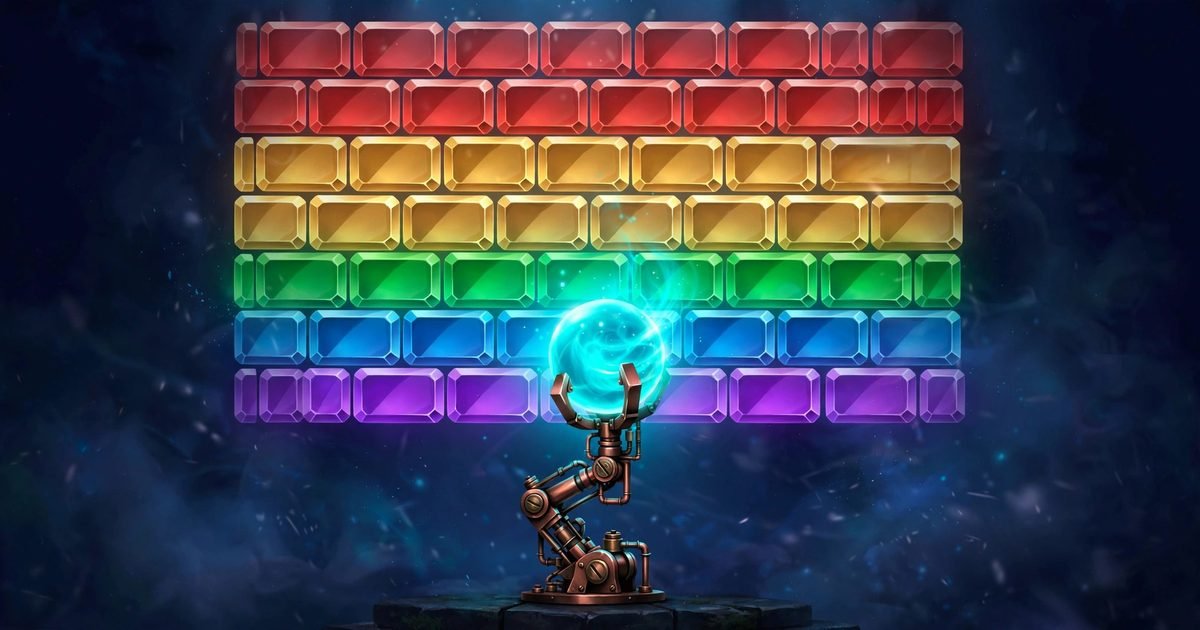
The game opens with the words Forging assets and a rising percent. Then the title screen appears. A copper arm holds a glowing cyan orb. A wall of coloured bricks stands above it. The text says the arm tracks the orb on its own. It says the arm will lock on. Then you tap to fling. It says do not let the orb slip past the red line. It reads Tap or click to fling, 4 levels, 3 lives. I read every word. Then I played. Two things on that screen did not match what I saw next.
The Setup in 30 Seconds
Here are the facts before the runs start. Level 1 is called CRYSTAL GRID. It has 5 rows of 8 bricks. That is 40 bricks. The colours are red and gold orange and green and blue and purple. Each brick is worth 10 points. Every run starts with 5 red hearts. There is no bricks remaining counter. There is no target score. There is no timer. There is no moves counter. You count the bricks yourself by looking at the wall.
The goal is to clear all four levels. The Game Over panel says so. It says the prism awaits. Levels 2 to 4 were never reached in my two runs. No level complete screen was seen. No win screen was seen. This post does not guess what the later walls look like. It sticks to Level 1.
One click is the only action that matters. The left mouse button flings the orb. Mouse hover does not move the orb. It moves only a small dark circle with a cyan ring. That circle is not the orb. Do not chase it. The orb stays on the arm until you click. Space and the arrow keys were not tried. Touch was not tried. This log tells you to use the mouse click. Nothing else was proved.
Run 1: Six Bricks, 60 Points
Run 1 started with 5 hearts. The arm swung in a loop. I watched two full swings before my first click. I did not click at once. The arm moves the same way each time. Two swings show you the range. They show you where the arm pauses at each end. They show you how fast it moves through the middle.
I clicked once. The orb flew up toward the wall. It bounced. It broke a brick. It came back. Ten points appeared. I waited. I clicked again. The same cycle. One fling. One brick at most. One long wait. Each fling took 10 to 60 seconds in my runs. That is slow. Forty bricks at one per fling would take a long session.
Run 1 ended with 6 bricks broken and 60 points. The best score of 60 stayed on the screen. It stayed across runs. It stayed after a reload. The game remembers your best score. A bad run does not erase a good one. That is useful to know.
One thing bothered me in Run 1. The title screen says the arm will lock on. I left the arm idle for 10 seconds. Then 30 seconds. Then 30 seconds more. No LOCKED indicator showed at any point. The arm kept swinging. So the fling is not about waiting for a lock. It is about watching the swing and choosing the moment yourself.
Run 2: Two Bricks, 20 Points
Run 2 started with 5 hearts again. The best score still read 60. I played the same way. I watched the swing. I picked a brick before each click. I clicked when the arm moved toward my brick. The orb keeps the motion of the arm. A click on the way toward the target gives the orb a better line. A click on the way away sends it wide. This was not measured with numbers. It is what the flings suggested.
Run 2 ended with 2 bricks broken and 20 points. The best stayed at 60. Run 2 was worse than Run 1. The best score did not drop. That is the point of a best score. It holds your best run while the rest fall short.
Hearts went missing in both runs. A heart is lost after a fling that does not return. The orb goes up. It bounces. It does not come back. Then a heart is gone. The red dashed line at the bottom is the line the title screen warns about. Do not let the orb slip past it. I did not watch the orb cross the line in the same instant a heart was lost. So I report the heart loss and the red line as two separate facts. I do not claim the line itself takes the heart. I say only that a lost orb costs a heart.
Screen Says One Thing, Play Says Another
Two mismatches matter for how you plan a run. First, the lives. The title says 3 lives. Every run started with 5 red hearts. Five hearts give you more room than three lives. But a heart can still go missing after a fling that does not return. Plan your risks around the hearts you actually have. That is five, not three.
Second, the lock. The title says the arm locks on. No lock was seen in either run. The arm swung in a loop for over a minute of idle time in total. No indicator appeared. Do not wait for a lock that never comes. Pick the moment yourself.
There is a third small mismatch. On the first Game Over the top HUD still showed 1 red heart even though the panel said out of lives. The run was over. The panel showed the counts from the run. It read Out of lives. The crystal wall is still standing. It showed Try Again and Back to Games. The heart on the HUD did not change the result. But it is worth knowing so you do not wait for one more fling that will not come.
Three Rules I Play By Now
Rule one. Watch two full swings before the first click. Do not click at once. The swing is the only thing you can read. You cannot steer the orb after the click. You can only pick the moment. Two swings show you the range and the speed. That is your whole preparation.
Rule two. Pick one brick before you click. Look at the wall. Pick one brick in the lower rows. Aim your timing at that brick. The lower rows are closer to the arm. The orb reaches them sooner. A brick in the bottom row is a shorter trip than a brick at the top. The runs did not prove lower bricks break more often. But the travel is shorter and the bounce is easier to read.
Rule three. Wait for the orb to come back before you click again. A second click while the orb is still in the air does not help. It does not add a second orb. It does not speed the first one. Watch the bounce. Watch where it lands. Then click again. A player who clicks again at once learns nothing from the bounce.
One more thing. Do not chase the combo label. It stayed at zero through both runs. It may rise in a later level. It did not rise in Level 1. Playing for a combo you cannot see is a way to waste hearts. Play for one brick at a time. Ten points at a time.
The Buttons That Work and the One That Broke
Pause worked. It showed PAUSED with Resume and Restart. Resume was tested. It took the game back into play. Restart was seen but not pressed. If you need a break between flings, pause is safe. The fling cycle is long. A pause costs you nothing.
Mute was clicked once. The icon already showed muted. It stayed muted. No sound was heard at any point. This post does not tell you what the sound is like. It only says the mute icon was already muted when it was clicked.
Fullscreen had a problem. The first click opened a full width view. Later a tap in fullscreen collapsed the frame to a short strip. Clicking Fullscreen again did not restore it. A reload restored it. So if the frame shrinks in fullscreen, reload the page. Do not keep clicking Fullscreen. The reload brings the game back to its title screen.
Escape did nothing. It did not pause the game. It did not close anything. Use the on screen Pause button. Do not rely on the keyboard.
What I Still Do Not Know
Levels 2 to 4 are unknown to me. I never reached them. I do not know what their walls look like. I do not know if the combo label rises there. I do not know if the fling changes. I do not know what the win screen looks like. The Game Over panel says clear all four levels. That is all I know about the end of the game.
Touch is unknown. Keyboard is unknown. I used the mouse only. I do not know if a tap works the same as a click. I do not know if any key does anything. Escape did nothing. That is the only key I tried.
The score maths is simple. Forty bricks at 10 points each would be 400 points for a full Level 1 clear. That number was not seen on any screen. It is simple maths from two facts that were seen. Forty bricks and 10 points per brick. It is not a target the game showed. The game showed no target score at all.
Five Questions, Five Short Answers
How many bricks are in Level 1?
Level 1 has 40 bricks in 5 rows of 8. The colours are red and gold orange and green and blue and purple. There is no counter, so you count them by looking at the wall.
How much is one brick worth?
One brick is worth 10 points. Six bricks gave 60 points in Run 1. Two bricks gave 20 points in Run 2. No other scoring was seen. The combo label stayed at zero.
How many hearts do you start with?
You start with 5 red hearts. The title screen says 3 lives, but every run started with 5 hearts. A fling that does not return can cost a heart. When the hearts are gone the Game Over panel appears.
Does the arm lock on before you fling?
No lock was seen. The arm swung in a loop for 10 seconds, then 30 seconds, then 30 seconds more. No LOCKED indicator appeared. You pick the moment yourself by watching the swing.
Can you finish Level 1 in one sitting?
Not in my two runs. At most one brick broke per fling. Each fling took 10 to 60 seconds. Level 1 was not finished. Levels 2 to 4 were never reached. No level complete screen was seen.
Should You Play It
Crystal Breaker is a slow game that looks fast. The wall is bright. The orb glows. The arm swings. But the play is one click, one brick, one long wait. The score climbs 10 at a time. The hearts fall one at a time. The best score stays when you leave. That is the game as I played it.
If you like calm games with one clear action, this one fits. If you want fast tapping, try Mole Mash instead. There the moles pop up one at a time and you tap them as they appear. It is quicker than a fling cycle. Or try Zig Zag Warp. There you hold to fly up and release to glide down, and the speed keeps rising.
You can browse more games from the All Games page. You can read more about this site on the About Us page.